


Prepare for ecommerce peak season: How to protect brand reputation and revenue leakage

Ecommerce peak season lasts longer than the sales calendar suggests. Orders spike around Black Friday and Cyber Monday. Then the returns from those orders keep arriving at your warehouse well into January.
This year, the stakes are higher still. Adobe forecasts $275.1 billion in U.S. online holiday sales for 2026, with Cyber Monday alone expected to bring in $15.1 billion. Mobile commerce is set to carry 57.4% of that spend.
Consumer expectations are high the moment they place the order. In DHL’s E-Commerce Trends Report 2025, 76% of U.S. shoppers said they’d abandon a cart if their preferred delivery option weren’t offered. And 73% said they won’t buy from a retailer at all if they don’t trust its delivery and returns provider.
With more orders to fulfill and little room for missed delivery promises, ecommerce businesses need to prepare for more than the Black Friday and Christmas sales rush. That means setting realistic expectations before peak, keeping customers informed when volumes rise and managing the returns that follow. This guide walks you through the key ecommerce peak season dates for 2026, with practical tips to maintain and boost customer satisfaction at each phase, plus examples of how parcelLab can help.
What is ecommerce peak season?
Ecommerce peak season is the part of the year when order and return volumes spike. For most online retailers, this is between Black Friday and Christmas. The exact dates depend on your business model, though. Some ecommerce brands also see smaller peak periods around back-to-school season or Valentine’s Day, for example.
Planning for the holiday shopping season starts months before the first promotions go live and continues well beyond the December sales rush. Deliveries and returns often stretch into January, so retailers need to account for the additional pressure on fulfillment, customer support and returns operations.
But strong consumer demand doesn’t mean shoppers will buy without thinking. As Deloitte vice chair Natalie Martini notes, consumers are “making deliberate choices about how they spend,” making reliable delivery promises and a smooth returns experience all the more important.
Problems that are manageable during a normal week can quickly pile up during peak season. Higher order volumes put more pressure on fulfillment, deliveries and customer support:
- Fulfillment mistakes and inventory management errors lead to more incorrect or incomplete orders.
- Carrier delays affect more shipments and increase the risk of missed delivery dates.
- Holiday shoppers have strict delivery deadlines, leaving little room for delays.
- Unclear tracking information drives more WISMO (Where is my order?) inquiries.
- Post-holiday returns create another surge in warehouse and customer support workloads.
Returns, in particular, can keep teams busy long after the holiday delivery rush. Adobe’s 2025 holiday recap found that one in seven holiday-season returns happened in the six days after Christmas, while retailers surveyed by the National Retail Federation expected 17% of holiday sales to be returned. With that much merchandise coming back, retailers need to plan for the post-holiday workload well before December ends.
Key ecommerce peak season dates in 2026
With Thanksgiving falling on November 26, retailers have just four weeks between Black Friday and Christmas in 2026. As the Mastercard Economics Institute notes, this leaves less time for holiday shopping and deliveries. With Cyber Monday on November 30, you’ll need to plan your sales promotions and Christmas shipping deadlines together to ensure orders arrive on time.
| Event | 2026 date/window | Why retailers should care |
|---|---|---|
| Early holiday campaigns | October onward | Promotions begin, and parcel volumes start rising |
| Singles’ Day | November 11 | Important for international and cross-border retail |
| Thanksgiving | November 26 | Start of the Cyber Five |
| Black Friday | November 27 | Major shopping and fulfillment surge |
| Cyber Monday | November 30 | Biggest online shopping day of the season |
| Christmas | December 25 | Delivery promises and carrier cutoffs become critical |
| Post-holiday returns | Late December–January | Reverse logistics, refunds and exchanges rise |
Make sure your calendar also includes holiday shipping cutoffs for each carrier and key market you serve. You’ll need these dates to set realistic delivery expectations for customers shopping close to Christmas.
Build your ecommerce peak season plan before volume rises
Solid peak season planning should include what happens before, during and after the holiday rush. Prepare your peak season operations before online sales surge, monitor delivery performance as order volumes rise, and use what you’ve learned to plan better for next year. Let’s look at what to prioritize at each stage.
Before ecommerce peak season starts
Peak season planning should remove as many preventable problems as possible before order volumes rise. Prepare early and set expectations you can realistically meet, even during the busiest weeks.
Forecast where pressure will appear
First, analyze your historical sales data from last year’s peak season. Check how many orders you handled in each market and warehouse, along with carrier performance and return rates during the same period.
But demand forecasting shouldn’t stop at sales numbers. You’ll also need to estimate how much extra work your teams can expect. Think about:
- How many parcels will each carrier need to handle on your busiest days?
- How many customer support requests are you likely to receive?
- How many returns can you expect in January?
- Which products might sell out, and which could leave you with excess inventory once seasonal demand drops?
These estimates will help you plan fulfillment capacity and staffing, including whether you’ll need to hire temporary workers or extend support hours. If you offer international shipping, remember to account for possible customs delays when estimating delivery times.
Also budget for higher shipping costs. According to Supply Chain Dive, UPS’s flat service-level holiday surcharges are roughly 22% to 25% higher than in 2025. They’ll remain in place until January 16, 2027, so you’ll need to account for higher costs during the post-holiday returns period, too.
Finally, agree on contingency plans before the rush begins. Choose a backup carrier for each major market and decide when to stop offering expedited shipping if your warehouses start falling behind.
Test the path between checkout and delivery
Before peak season demand increases, make sure order details and tracking updates move correctly between your ecommerce platform, order management system (OMS), warehouse or fulfillment partner (3PL) and multiple carriers. Make sure customers can see the right information on your tracking page and receive notifications on time.
Don’t just test orders that arrive without problems. Try a split shipment, where items from one order arrive in separate parcels, or simulate a carrier delay. Then check whether customers can see what’s happening with their orders and receive the updates they need. Test your returns portal too, including return eligibility rules and confirmation messages.
If you’re introducing new software or integrations, test them with a small group of orders first. This gives you time to find and fix any issues before holiday order volumes pick up.
Set realistic delivery expectations before purchase
Make sure customers know when to expect their orders, especially as Christmas approaches. Your estimated delivery dates should account for both warehouse processing and carrier transit times, which can increase during peak season.
Show these dates clearly on product pages. Gift shoppers need to know whether their orders will arrive in time. If you offer expedited shipping, make sure its Christmas cutoff is easy to find.
Prepare your customer communication journey
Order confirmations and delivery notifications are a good start, but you’ll also need to keep customers informed when things don’t go as planned. Set up notifications for:
- Delays before dispatch
- Delays during transit
- Failed delivery attempts
- Split shipments
- Orders out for delivery
Keep these messages on-brand instead of relying on carrier notifications. This gives online shoppers a consistent customer experience and keeps them on your website when they check their orders. You can also use these visits to share relevant product recommendations and encourage repeat purchases.
Configure Black Friday, Cyber Monday and Christmas returns in advance
Decide your holiday return windows before peak season sales increase, including which products customers can return, which policies apply, and how you’ll handle unwanted gifts. Also consider offering exchanges or store credit alongside refunds.
It’s much easier to set these rules now than to change them in January when your warehouse is already dealing with a surge in returns.
How parcelLab can help
Preparing for peak season means getting your delivery estimates, customer notifications and return policies ready before orders start piling up. parcelLab helps you manage these processes in one place, so you can make changes as needed throughout the season.
For delivery estimates, parcelLab’s predictive delivery promise uses historical shipment data, along with your warehouse and carrier performance, to calculate delivery dates for product pages and checkout. The model draws on data from over a billion shipments and achieves 92% prediction accuracy. You can also choose more conservative estimates during busy periods and add countdowns that show customers how long they have to order to receive delivery by a certain date.
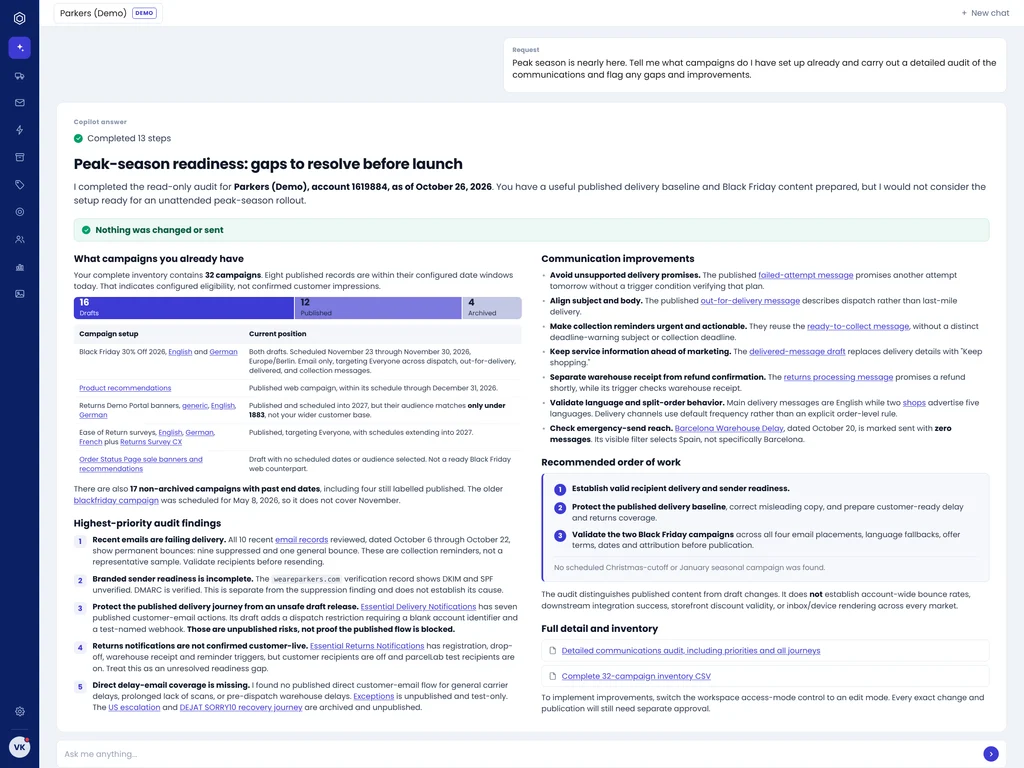
Once customers place an order, parcelLab’s tracking and communication tools let you send branded updates about delays, failed delivery attempts and other shipping events through channels such as email, SMS and WhatsApp. Customers can also check their order status on your own website, including the progress of individual parcels when an order is split into several shipments.
To prepare for the post-holiday returns rush, you can use the self-service returns portal to set extended holiday return windows, offer longer deadlines to VIP customers and exclude final-sale items. You can also let customers exchange items for a different size or color, or offer bonus store credit instead of a refund.
If you need to adjust these rules later, Copilot can help you make changes without searching through individual settings. For example, you can ask it to extend the return deadline to January 31 for orders placed in November and December. Copilot prepares the change for your review, and nothing takes effect until you approve it.
During peak
Once the holiday rush begins, even the best preparation won’t prevent every delay. Your priority now is to spot problems early and keep customers informed, ideally before they feel the need to contact support.
- Keep an eye on delivery performance. Check for stalled shipments and orders at risk of missing their promised delivery dates. Compare carrier performance across markets to spot problems affecting multiple orders.
- Set clear customer expectations. If something goes wrong, explain what you know, what happens next and when they can expect another update. For significant delays, consider offering a goodwill gesture, such as a discount on their next order.
- Make split shipments easy to follow. When items ship separately, customers should be able to see which products have arrived and which are still on their way.
- Give your customer support team the full picture. Give agents access to current tracking information and previous customer communications so they can resolve questions faster. Keep your FAQs and return policies easy to find, too.
- Adjust your communication as needed. If new issues come up that your existing notifications don’t cover, update your messages and triggers so affected customers know what’s happening.
Clear communication can make a measurable difference during busy periods. Outdoor retailer Bergzeit previously struggled with spikes in customer inquiries around events like Black Friday, when its teams were overwhelmed, and customers lacked clear delivery information. After introducing branded, real-time delivery updates through parcelLab, Bergzeit reduced WISMO inquiries by 21%, giving its support team more time to handle complex cases.
How parcelLab helps
During peak season, you need to know which shipments are falling behind and keep affected customers informed. parcelLab brings tracking data from over 450 carriers into one place. The Trending Late feature identifies shipments at risk of arriving late. This gives you time to send customers an (automated) update before they contact support. Customers can also track split shipments on a single Order Status Page instead of checking each parcel separately.
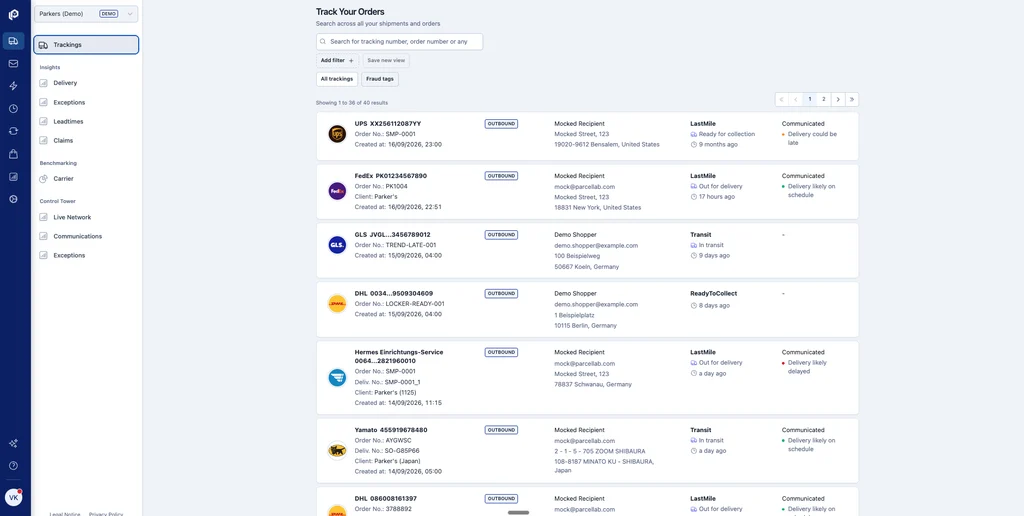
With parcelLab Insights, you compare delivery delays and exceptions across carriers and markets. This helps you identify which carriers are falling behind, where delays are concentrated and which shipments may need closer monitoring or additional customer updates.
When time is limited, Copilot can help you find answers without digging through reports. For example, you can ask which carriers have the highest exception rates or have it prepare a delay notification for U.S. shipments with no tracking updates in 48 hours. You can review the message and its sending rules before approving them.
Nancy Gurd, Director of CX at Caraway Home, used Copilot to compare courier exception rates, a task she says would normally take her “two to three hours.”
After peak
The holiday sales rush may be over, but your staff still has plenty on their hands. Returns tend to increase after Christmas, meaning more work for your warehouse and customer support teams. At the same time, you can start looking at what went well during peak season and what needs to change next year.
First, focus on managing returns:
- Make returns simple. Give customers an easy way to register returns online without contacting support.
- Offer alternatives to refunds. Exchanges and store credit can help you retain some of the revenue from holiday purchases and encourage customers to shop with you again.
- Keep customers updated. Let them know when you receive their return and when to expect their refund or exchange. This can help prevent another wave of support inquiries in January.
- Watch for return fraud. The NRF estimates that 9% of all returns are fraudulent. Look for suspicious return patterns and claims while keeping the process simple for legitimate customers.
After the busiest weeks, review your delivery and returns data to see where problems occurred. These metrics can help you decide what to improve before the next peak season:
| Metric | What to look for | What to do next year |
|---|---|---|
| Delivery promise accuracy | How often orders arrived by the promised date | Adjust estimates for routes with frequent delays |
| Delivery exceptions by carrier | Which carriers had the most problems in each market | Reallocate shipments or arrange backup carriers |
| WISMO inquiries per 1,000 orders | How often customers contacted support about their orders | Improve tracking information and delay notifications |
| Return reasons by product | Which products were returned most often and why | Improve product descriptions or size guides |
| Weekly return volumes | When the most returns reached your warehouse | Plan January staffing and warehouse capacity |
| Message engagement | Which notifications customers opened and clicked | Test clearer subject lines and message content |
How parcelLab helps
As holiday returns start coming in, parcelLab’s self-service returns portal lets you apply the policies you set before peak season. Customers can see which items they’re eligible to return and choose from the available refund, exchange or store credit options. They can also track their returns and receive status updates, reducing the need to contact customer service teams with questions like “Where is my return?” (WISMR).
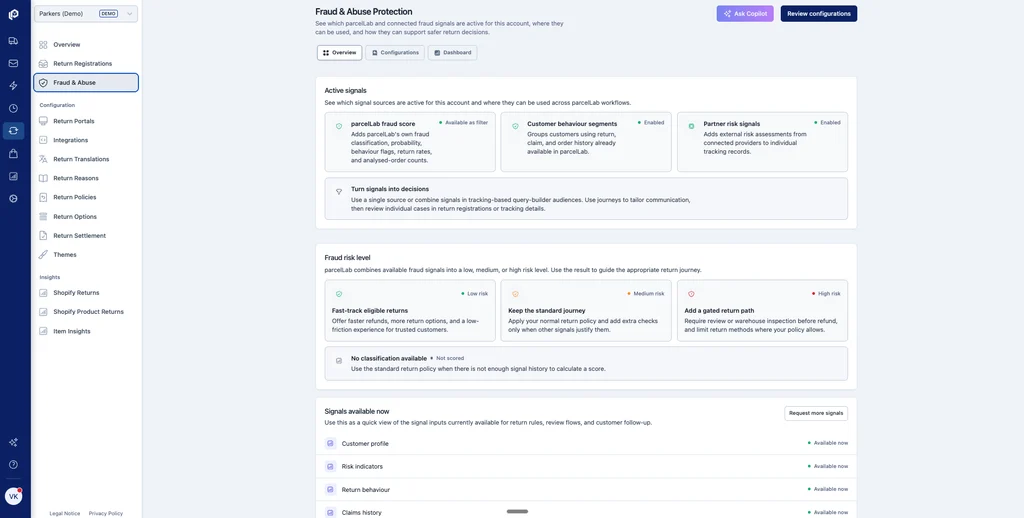
You can also use Fraud & Abuse Protection to handle potentially suspicious returns differently. Based on factors such as order and return history, customers receive a risk level you can use to set return rules. For example, you could require manual review instead of offering instant refunds for orders over $300 from high-risk customers.
Once the rush is over, parcelLab can help you prepare for next year. Its returns forecasting uses historical data and seasonal patterns to estimate expected returns, including after major shopping events, with 85% forecasting accuracy. At Conrad, Silvio Heider says knowing which products will return and when is particularly helpful for planning staff capacity.
You can also use parcelLab Insights to review delivery performance. Promise Insights shows how often orders arrived by the dates promised at checkout, while carrier benchmarking lets you compare carrier performance against industry data. These findings can help you adjust delivery estimates, review carrier choices and prepare for the next holiday season.
Turn peak season pressure into opportunity
Peak season success is about more than handling higher order volumes. Customers need reliable delivery dates, timely updates when things go wrong, and an easy way to return unwanted purchases.
Managing all of this gets harder as your business grows. With parcelLab, you can manage delivery promises, customer communication and returns in one platform.
Book a demo to see how parcelLab can help you ace the upcoming peak season.
FAQs
For most retailers, activity picks up in October and peaks between Black Friday and Christmas. The busy period often continues into January as customers return holiday purchases.
Ideally, start planning in summer. Aim to test your systems, confirm shipping deadlines, and finalize holiday return policies before promotions begin in October.
Show realistic delivery dates at checkout and proactively update customers about delays. Give customers a tracking page where they can follow their entire order, including items shipped separately.
Account for longer processing and shipping times when setting delivery estimates. Arrange backup carriers where possible, prepare delay notifications and monitor carrier performance throughout the season.
During peak, monitor delivery promise accuracy, carrier delays and WISMO inquiries per 1,000 orders. Afterward, review return volumes and reasons, along with customer communication performance, to identify improvements for next year.
Liked this Post? View more related posts below


