
Where is my order? A retailer’s guide to reducing WISMO

An order leaves your warehouse in two parcels. When the first arrives, your customer receives a “delivered” email and immediately contacts support about the missing items. Both parcels may be progressing as planned, yet you’ve created a WISMO inquiry by reporting only part of the story.
For your customer, one purchase means one package. They shouldn’t have to guess or ask to understand what’s happening. And your customer service team shouldn’t have to do it either.
Reducing those queries starts with finding the gaps between what you know and what customers can see. This guide explains how to identify those gaps, measure WISMO accurately and improve the post-purchase experience with clearer information throughout the delivery journey.
What does WISMO mean?
WISMO stands for “Where is my order?” You will often come across this term in ecommerce, logistics and customer support to describe inquiries about an order’s progress or delivery status. A WISMO ticket is a support record for one of those inquiries.
The question can arise before an order leaves your warehouse, while a parcel is in transit or even after the carrier marks it delivered.
What counts as a WISMO inquiry?
Common WISMO requests include:
- “Has my order shipped?”
- “Why hasn’t tracking updated?”
- “When will my package arrive?”
- “Why did only part of my order arrive?”
- “Why is my parcel held in customs?”
- “Tracking says delivered, but I can’t find it.”
Although teams often say “WISMO calls,” the term also covers messages sent through live chat, SMS, social media or email.
What is the difference between WISMO and WISMR?
WISMO concerns an outbound order. WISMR means “Where is my return?” and includes questions about a return’s progress, including the associated refund or exchange.
| Detail | WISMO | WISMR |
|---|---|---|
| Journey stage | Order placement through delivery | Return initiation through refund or exchange |
| Common triggers | Missing updates, delays or partial deliveries | Return receipt unclear, refund pending or exchange delayed |
| Data needed to answer | Fulfillment status, parcel tracking and promised date | Return tracking, warehouse receipt and refund or exchange status |
Why customers ask “Where is my order?”
There are multiple reasons for WISMO calls (apart from the obvious delayed shipping issue), including:
- Expectations were unclear before dispatch. “Shipping in three days” and “delivery in three days” are different, but may sound the same to a customer.
- The tracking status is unclear. A tracking number may appear as soon as the shipping label is created, before the carrier receives the parcel. If the status remains “Label Created,” customers may contact support to confirm whether their order has shipped.
- The tracking page doesn’t explain the full order. When items ship in separate parcels, or a shipment is held at customs, a basic status may not show what will arrive when or whether the customer needs to take action. They ask support to fill in the missing details.
What WISMO costs retailers
Every WISMO inquiry uses support time. Finding the answer may require an agent to check warehouse and carrier data before explaining the status to the customer. During busy periods, these avoidable questions can quickly fill up the support queue.
Costs rise when the first response doesn’t resolve the uncertainty. If an agent sends the same tracking link the customer has already checked, the customer may email again or call instead. Your team then has to handle several contacts about one order, while customers with lost parcels or other delivery problems wait longer.
Delivery uncertainty can affect the next purchase as well as the current support queue. DHL’s survey found that seven in ten would not shop with a brand if they did not trust its delivery and returns provider. The figure doesn’t measure WISMO directly, but it shows why unclear delivery information can become a retention problem, affecting customer loyalty and brand reputation.
Wyze encountered this problem when products from the same order shipped from different warehouses. Customers sometimes received one parcel without knowing when the rest would arrive, increasing support costs. After Wyze introduced real-time split-shipment updates and proactive delay notifications, WISMO inquiries fell by 20%, improving customer satisfaction while reducing operational costs.
How to measure WISMO accurately
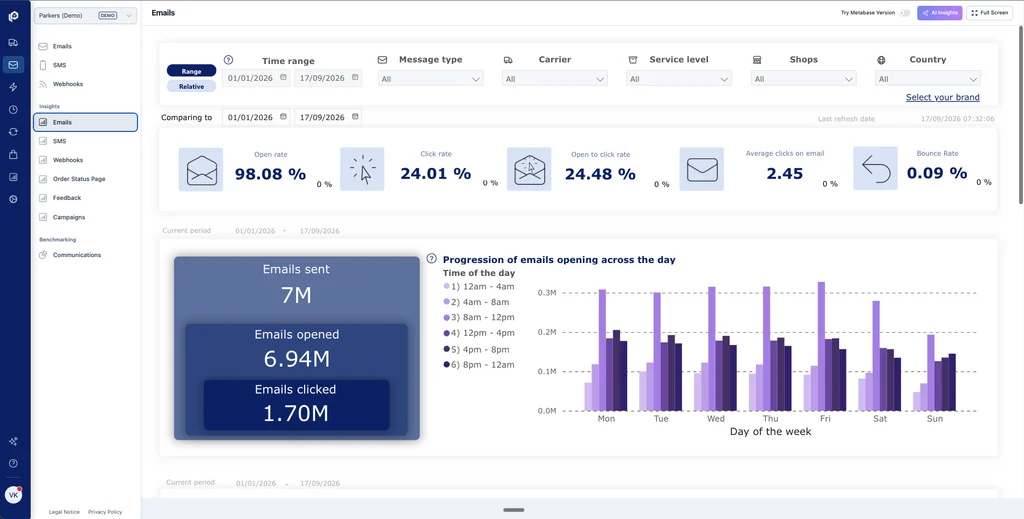
Break WISMO inquiries down by fulfillment location and carrier. Then review why customers contacted you. A high number of questions linked to one warehouse may indicate dispatch delays, while repeated complaints about a delivery service may show that its estimated dates are unreliable.
There are two things you can measure: the share of support tickets about order status and the share of orders that generate those tickets.
Measure WISMO contact mix
WISMO contact mix (%) = WISMO tickets ÷ all inbound support tickets × 100
This formula tells you how much of your support queue is taken up by order status inquiries.
Use the same calculation across email, phone calls, live chat and other support channels. Count only conversations started by customers. Track chatbot conversations taken care of by AI agents separately from inquiries handled by support agents so you can see the actual workload placed on your team by the high volume of ticket handling.
Set a consistent rule for merged and reopened tickets. For example, count several messages about the same issue as one ticket. If the customer contacts you again after the ticket has been closed, record it as a repeat contact. Don’t include automated delivery updates sent to customers because they aren’t inbound support inquiries.
Careful: Your WISMO volume share can drop because unrelated complaints increase, even when order-status inquiries stay the same or grow.
Measure WISMO order contact rate
WISMO order contact rate (%) = shipped orders generating at least one WISMO contact ÷ all orders in the same shipped cohort × 100
In this formula, a cohort is a group of orders sharing an event, e.g., their first shipment date. Group orders by the date they first shipped and track each group for the same period, such as 14 days. Don’t compare a group tracked for 14 days with one tracked for only three because older orders have had more time to generate WISMO inquiries.
Count each order once, even if it has several parcels or the customer contacts you more than once. Include questions asked before dispatch. Track unshipped orders separately. Mark recent results as incomplete until the full tracking period has passed.
Measure repeat contacts and cost
To understand what drives your WISMO workload, track:
- Orders generating more than one WISMO interaction, including repeat contact through another channel.
- Contact rates by carrier and route, with warehouse and market breakdowns.
- Contacts before and after the original promised delivery date.
- Contacts connected to split orders or delivery exceptions.
- The number of WISMO contacts handled through each support channel.
Calculate the support cost for each channel separately:
Monthly WISMO handling cost = WISMO contacts per channel × average handling cost per contact
For example, measure phone, email and live chat separately because they require different amounts of agent time. The average cost per contact should include agent time and any support expenses you can reasonably assign to that channel. Add the results together to estimate your total monthly WISMO handling cost.
Keep refunds, replacements and reshipments out of this calculation. Those are costs of resolving a delivery problem, while the formula measures what you spend answering customer inquiries. Reporting them separately shows whether high costs come from repeated questions or fulfillment problems.
A single “good” WISMO rate would be misleading. In DigitalGenius’s analysis of customer queries during the 2022 holiday peak, WISMO represented about 25% of queries overall, more than 33% for consumer goods and electronics retailers and about 16% for footwear retailers. Compare your own results over time using the same counting rules and follow-up window. Review the rate alongside repeat contacts, resolution time and customer satisfaction.
How to reduce WISMO calls and messages
1. Set an accurate delivery expectation before checkout
Show an estimated delivery date or range that accounts for preparation time and carrier transit even before checkout; explain when the order will be dispatched. Show how the cutoff time affects it, such as orders placed after 2 p.m. shipping the next working day. Clearly identify preordered or backordered products and whether they will delay the whole order or ship separately.
Repeat the promised dispatch or delivery date in the order confirmation. Save that original date instead of replacing it when the estimate changes. Then show the customer the new date while using the original one to explain the delay and measure whether you met the promise made at checkout.
2. Send updates at meaningful delivery milestones
Send a shipping notification when you have information that matters to the customer, such as dispatch confirmation or a failed delivery attempt. Explain the next step and always include a tracking link.
Don’t send a new notification for every internal scan. Several “in transit” messages can confuse customers more than no updates.
Check whether your notifications actually reach customers by monitoring email delivery and bounce rates. Then track whether WISMO inquiries decline. The number of messages sent doesn’t show whether customers received the information or found it useful.
3. Detect and explain delivery exceptions early
Set clear rules for when a shipment needs additional attention. For example, a failed delivery attempt can trigger an immediate alert. A gap between carrier scans should only trigger one after the normal scan interval for that delivery service has passed. This prevents customers from receiving delay warnings when the parcel is still moving as expected.
When a problem comes up in the order fulfillment process, tell the customer what happened and explain the next step. Include a revised expected delivery date only when you have a reliable one. Otherwise, say when you will provide another update.
4. Offer a branded self-service order status page
Carrier tracking pages usually follow one parcel rather than the customer’s complete order. They may also show technical statuses without explaining what they mean or what the customer should do next.
A branded tracking page lets you present tracking data in clearer, customer-facing language and add information the carrier may not have, such as the original delivery estimate or relevant support options. Customers can access it from your website and delivery emails instead of searching through separate carrier pages.
Include a clear route to support for issues the page cannot resolve, such as a disputed delivery or a parcel with no recent scan. Customers shouldn’t have to search elsewhere for contact details in cases when the tracking information doesn’t provide an answer.
5. Connect every parcel to the complete order
Link each tracking number to the items inside that parcel. If one parcel is marked as delivered while another is still in transit, make it clear that only part of the order has arrived.
Carriers often use different terms for the same delivery stage. Convert those events into consistent, plain-language statuses for customers, but keep the original carrier data so support teams can investigate problems. Also show the time of the latest scan. Tracking information is only as current as the data the carrier supplies.
6. Give service teams complete order context
Give support agents the delivery date promised at checkout and the latest tracking information. They should also see the updates already sent to the customer and any previous contacts about the order.
Make this information available in your help desk or customer relationship management system if possible. Agents can then answer without searching several systems or asking customers to repeat themselves.
Assign responsibility for the next step. If the warehouse needs to investigate, support should remain the customer’s point of contact and provide a clear timeline for the next update.
7. Automate routine answers and escalate complex cases
Automation should handle questions with reliable answers in the current order data, such as the latest parcel status or expected delivery date. Before showing personal order information, the automated flow should require the customer to sign in or use a secure order link. A knowledge base can explain general shipping policies, but order-specific answers must come from the customer’s order records.
A human agent should take over when the automated flow can’t provide a reliable answer. This includes potentially missing parcels, disputed deliveries and cases where the carrier data is incomplete. The agent should receive the conversation history and the order status already retrieved by the automated system, so they can continue the investigation without asking the customer to start over.
8. Use WISMO data to fix recurring causes
Tag each WISMO inquiry with its main cause. For example, separate questions about orders that haven’t shipped from questions about tracking that hasn’t updated. This shows why customers need help, not just how many inquiries you receive.
Start with the most common cause. If customers frequently contact you after receiving only part of an order, clarify split-shipment updates. If questions increase when a warehouse misses its dispatch estimate, adjust the preparation time shown at checkout or address the underlying delay.
After making a change, compare the same order types again. Check whether fewer customers contact support, whether the first response resolves their question and how customers rate the help they received. A short survey after the case closes can provide that last measure. Moving an inquiry from phone to chat may reduce handling costs, but it doesn’t remove the reason the customer needed help.
How parcelLab helps manage and reduce WISMO inquiries
Some WISMO inquiries are unavoidable, especially when shipments are delayed, tracking information is incomplete, or customers need help with a delivery exception. The goal isn’t to eliminate every question. It’s to help customers find reliable answers independently and give support teams the information they need when human assistance is required.
With parcelLab, you can connect delivery promises, carrier tracking and customer communications to manage WISMO more effectively. Routine questions can be resolved through self-service or automation, while more complex cases receive the attention of your customer service team.
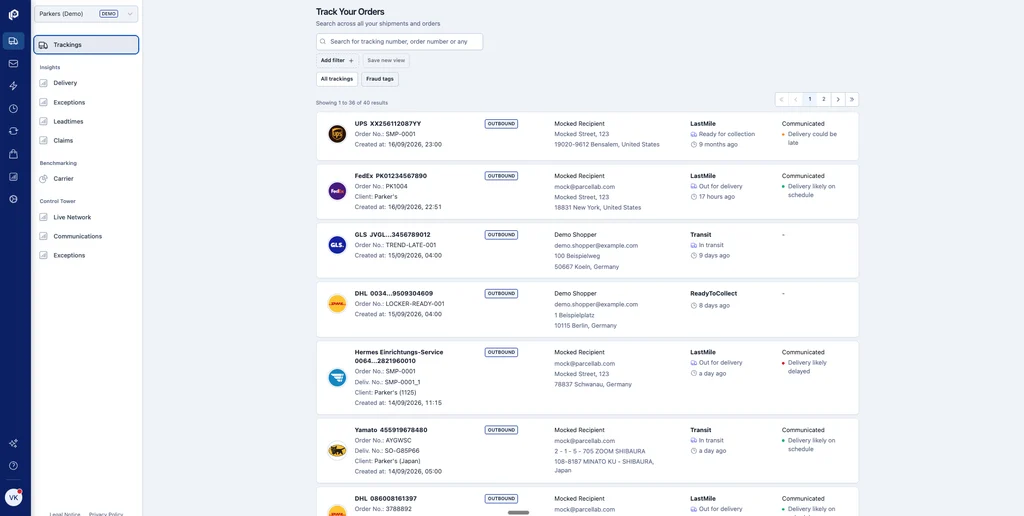
Here are the parcelLab capabilities that work together to improve your customers’ trust:
- Predicted delivery dates across the customer journey. parcelLab calculates arrival estimates based on your warehouse and carrier setup. You can provide customers with the expected date on product pages, at checkout and in post-purchase messages, while retaining the original promise for performance measurement.
- Email and SMS triggered by delivery events. You can define which carrier events trigger a message and set different conditions by market. This includes dispatch confirmations and delivery exception updates. Webhooks can pass the same events to connected systems (timing depends on the carrier data received). parcelLab also tracks how much of this communication reaches your clients and the email open rate.
- Early identification of possible delays. Once configured, parcelLab compares carrier progress with the delivery date announced to the customer. You can set your own thresholds and display the predicted delay risk on the tracking page.
- Order-level tracking on your website. Embed a branded tracking page into your site, powered by parcelLab. It can show purchased items alongside each parcel, giving customers a complete view of split shipments and their order history. You can customize the design and set up the page in over 25 languages.
- Faster, more accurate WISMO resolution for customer service teams. parcelLab gives support agents access to order-level tracking, carrier updates, split shipments and delivery exceptions in one place. Through its Customer Service tools and integrations with platforms like Zendesk, Gorgias and Salesforce Service Cloud, agents can investigate delivery issues without switching between multiple carrier systems. This helps them provide accurate answers faster, while self-service and automated responses handle routine inquiries that don’t need human intervention.
- Automated responses based on current order data. Configure parcelLab to answer WISMO questions through email or an integrated chat. Responses are based on the customer’s order and tracking records. Edge cases requiring deeper investigation get escalated to the support team.
Book a demo to see how easily you could reduce your WISMO-related costs.
Give your customers answers before they have to ask
Repeat WISMO queries are rarely just a carrier problem. They appear when the promise made before checkout, the events reported after dispatch, and the answer available don’t tell the same story.
To fix this, and the related customer frustration, start with the order groups that generate the most WISMO calls. Find the first point where the information becomes late, incomplete or difficult to understand, then fix that gap. Measure repeat contacts and post-purchase experience satisfaction alongside ticket volume. Fewer inquiries only count as progress when customers can still get a useful answer if something goes wrong.
For retailers managing several carriers, countries, warehouses or split shipments, parcelLab sorts it all in one platform that connects the original delivery promise with carrier data and proactive communication. Book a demo to see how parcelLab can help your team manage WISMO inquiries, resolve delivery issues faster and reduce support costs through meaningful self-service deflection.
FAQs
Set a realistic delivery date before checkout, send updates when the order moves or needs attention and show every parcel on one order-status page. Use the remaining inquiries to find and fix the next information gap.
Yes, when it has secure access to current order and tracking data. Missing parcels, disputed deliveries, and unclear carrier data should go to a human agent. parcelLab’s WISMO/R Agent can answer routine order and return questions, then pass exceptions to support with the relevant context.
No single rate applies to every retailer. Track both the share of support contacts and the share of shipped orders that generate a WISMO inquiry, then compare equivalent order groups using the same rules. Review repeat contacts and customer satisfaction too.
No. It can answer routine questions, but it cannot resolve every missing parcel, disputed delivery or carrier data gap. Show the complete order and keep a clear route to support to improve the customer experience.
Liked this Post? View more related posts below


