From six manual follow-ups to 100+ automations: How one CX leader built an automation engine without an IT team
“We’d love to automate – but we don’t have the engineering team for it.”
If you’ve said this, or heard it in a meeting, or quietly thought it while watching another brand’s case study, here’s the update: this excuse died in 2026. CX automation without engineers is no longer a contradiction — the tools for building it are more accessible than ever.
Taylor Johnson is the Director of Customer Experience at Nathan James, a fully online DTC furniture brand selling flat-pack furniture through their own site, Amazon, Wayfair and other major retailers. Her team: 21 frontline agents, two team leads. No software engineers, no automation specialists.
Her automation count: over 100. IT involvement: one automation. The rest she built with her team.
“There’s just no excuse nowadays. I think it’s so important for people to not be afraid to step out of the comfort zone and explore those more technical areas that they’ve not explored before. Building code, building JavaScript, anything like that is possible now with the tools that we have.”
What follows are three real automations Taylor built. Each one follows the same pattern:
Identify a low-risk, high-impact process
Choose the simplest tool that works
Iterate and measure.
None required a software team or a transformation budget – but all produced measurable results.
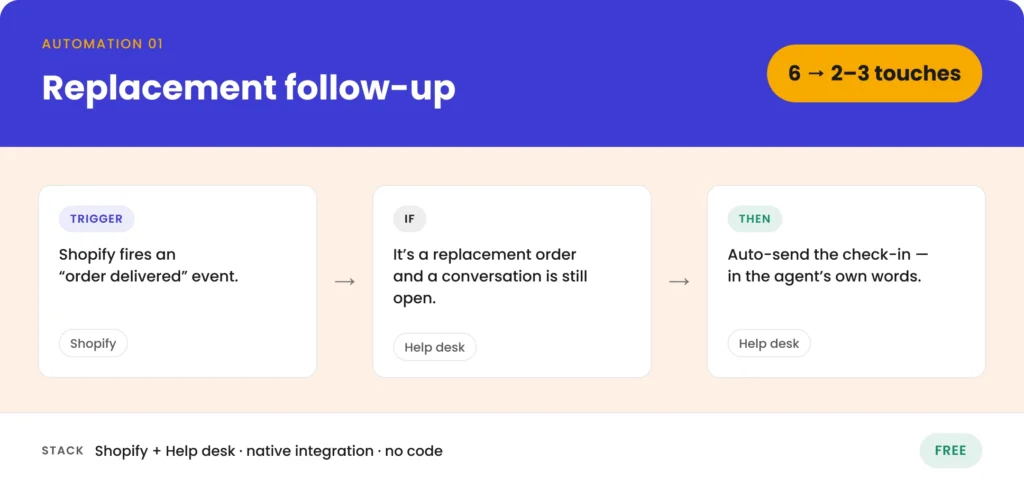
Scaling the human touch – from six manual touches to two or three
The problem: Nathan James had a signature move. When a customer reported a product issue and the team sent a replacement, an agent would manually follow up once the replacement was delivered. A simple message: “Hey, saw this got delivered, just want to check in and make sure everything’s good now.”
Customers loved it, as feedback showed. In times where post-purchase acts as a hidden growth-engine, the follow-up was a genuine brand signal – the kind of touch that separates “fine” customer service from “I’m telling my friends about this.”
At the same time it was crushing agent capacity. Every replacement ticket required the agent to: monitor delivery status, notice when it arrived, manually craft the follow-up, wait for the customer’s response and close the loop. From open to close, the average ticket required at least six touches.
The solution: A native Shopify integration with their help desk. The workflow listens for “order delivered” events in Shopify, then layers two conditions:
Is this a replacement order?
Does it have an open conversation?
If both conditions are met, the system automatically sends the check-in message.
No AI, no third-party automation platform, no code. Just a deterministic workflow using tools the team already had access to.
The critical design choice: instead of using a template or an AI-generated version, the automated message was copied directly from what agents were already saying.
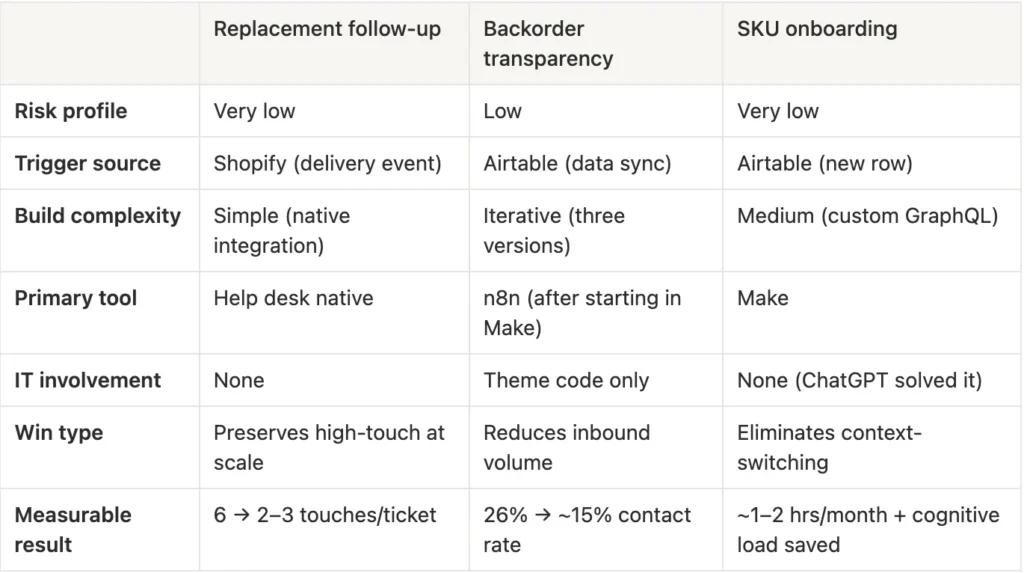
The result: Average touches per ticket dropped from six to two or three. Customers can’t tell the difference. The high-touch feel survived intact – because the message is the human message, just delivered automatically.
The lesson: This automation was free. It used native integrations between two tools the team already paid for. If your help desk connects to your eCommerce platform, you can probably build something like this today. Start with the message your agents already send, automate the delivery – and that’s it.
Cutting contact rate from 26% to 15% – in three iterations
The problem: Nathan James introduced backorder and preorder functionality – letting customers buy products before they were physically in the warehouse. The only customer-facing information was a single line on the product page: “Estimated to ship on [date].”
Contact rate exploded to 25–26% (conversations divided by related orders). Customers couldn’t remember their ship date, wanted to check if it had changed, or hadn’t noticed it in the first place. WISMO – “where is my order?” – on steroids.
“Ideally in a perfect world, we would have had some of those automations in place before then. Obviously it’s not an ideal world. So sometimes you just got to roll with the punches.”
Taylor’s first lesson from this experience: build the automation infrastructure before you launch the customer-facing feature – not after the contact rate spike forces you to.
Iteration one: Email updates. The team funneled all backorder and preorder data into an Airtable table, connected Airtable to Klaviyo and sent customers email updates with their estimated ship date. Date changes triggered immediate notifications.
Better – but not solved. Emails got lost in spam and promotions folders. Customers didn’t always see them. And because estimated ship dates could change daily or weekly, frequent emails risked inbox fatigue. The team had to balance “keep me informed” with “stop emailing me.”
Iteration two: The insight. Customers were already visiting their order status page repeatedly. They expected to see the estimated ship date there, but the page showed nothing. The answer wasn’t more emails. It was meeting customers where they already were.
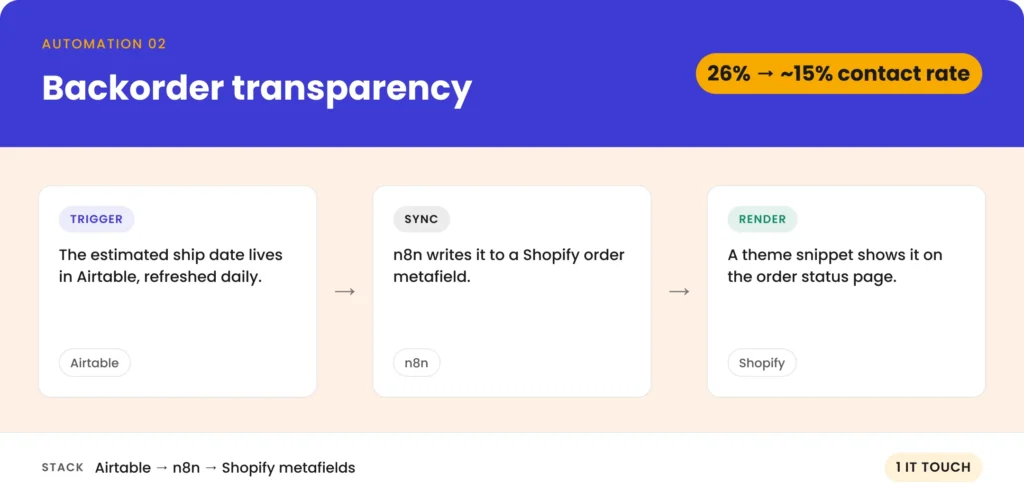
Iteration three: Shopify metafields on the order status page. Taylor’s team created a Shopify metafield to attach the estimated ship date as custom data to each order. An automation synced the date from Airtable to the Shopify order metafield, refreshed daily. If the date changed in Airtable, it updated on the order status page automatically. The software team added a small piece of code to the Shopify theme to render the metafield on the order status page. This was the only IT-assisted piece across all three automations.
The message to customers became simple: “Check your order status page anytime – it always shows the latest estimated ship date.”
The tooling twist: Taylor’s default automation tool is Make. But Make charges per item processed. With 2,000 to 3,000 orders to sync daily, the credit math broke down fast. She switched this specific workflow to n8n, which charges per workflow execution rather than per item. Same 3,000 orders, one execution. Significant cost savings.
The result: Contact rate dropped from 26% to 15–16% – with a significant portion of that reduction driven by these automation improvements. In absolute terms: roughly 800 to 1,000 fewer contacts per month. Approximately 60 to 70 hours of team time saved monthly.
The lesson: Iterate. The first version doesn’t have to be the final one. This fix took three attempts until it landed. The important thing was progress: Each iteration was better than the last.
Eliminating the hidden cost of context switching
The problem: Every time Nathan James added a new product to the catalog, two manual tasks had to happen. First, add the new SKU to a dropdown field in the help desk, so agents could tag conversations by product. Second, create a corresponding hardware SKU in Shopify, so agents could send replacement hardware packs to customers.
Each task took one to two minutes. With 30 to 40 new SKUs per month, the direct time cost was maybe one to two hours monthly. Not catastrophic.
But the real cost was invisible. If an agent was mid-conversation with a customer who needed a hardware pack – and that SKU hadn’t been onboarded yet – the agent had to stop the conversation, submit a request to add the SKU, wait (potentially hours, or days if it was the weekend), then remember to come back and process the order. The customer waited. The agent lost their train of thought. The person doing the manual onboarding had to drop their current work, onboard the SKU, then return to whatever they were doing with lost context.
The compounding cost that never shows up in a time-saved spreadsheet? Context switching.
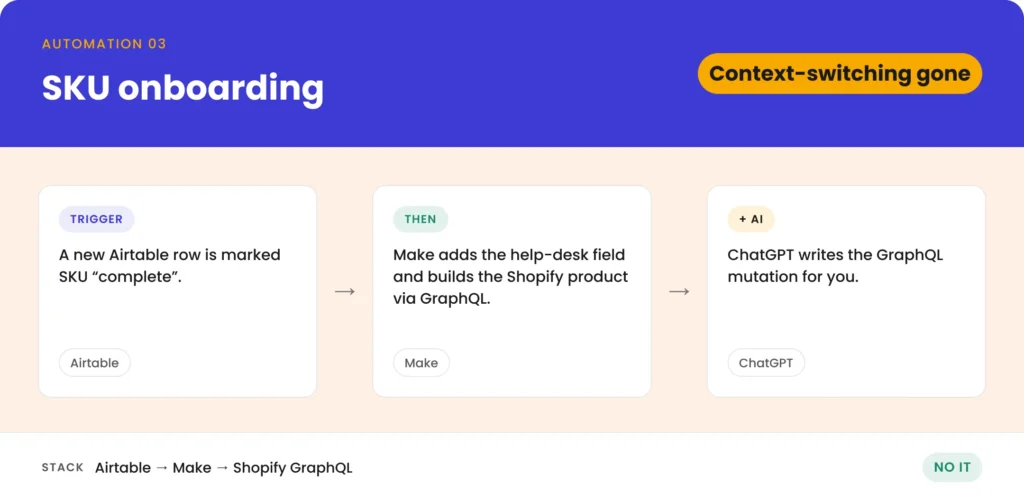
The solution: The product engineering and manufacturing teams already enter new SKU data into Airtable when a product is in production. Taylor set up a Make workflow that listens for new Airtable rows where the SKU is marked complete. Once triggered, Make automatically adds the SKU to the help desk dropdown field and creates the hardware SKU in Shopify with all predefined fields filled out.
One problem: Make didn’t have a native action for creating Shopify products with all the fields Taylor needed. So she used Shopify’s GraphQL API instead and asked ChatGPT to write the mutation.
“I just asked ChatGPT: “Hey, I need to add this SKU to Shopify. Here are all the fields that I have to be able to fill out and what their values will need to be. Help me build the mutation. […]” You can even screenshot the Make UI and be like: “Here’s what it looks like. Tell me where to put these fields.” So even if you have no idea where to put anything, you can screenshot it and ask and it’ll tell you.”
The result: One to two hours per month of direct time saved – the lesser win. Context-switching eliminated for both agents and the onboarding person – the bigger win. Customers no longer wait days for hardware packs to become orderable.
The lesson: Don’t measure automation ROI only in direct time saved. The compounding cost you eliminate is the cognitive load – the interruptions, the lost focus, the customer waiting because the system couldn’t keep up with the product roadmap.
The pattern: what all three automations have in common
Three automations, three different problems, same principle: low risk, high impact, built in-house. While many teams are still battling the question how to integrate AI in CX, Taylor did the thing many people never arrive at: she simply started somewhere.
The result: Contact rate dropped from 26% to 15–16% – with a significant portion of that reduction driven by these automation improvements. In absolute terms: roughly 800 to 1,000 fewer contacts per month. Approximately 60 to 70 hours of team time saved monthly.
The lesson: Iterate. The first version doesn’t have to be the final one. This fix took three attempts until it landed. The important thing was progress: Each iteration was better than the last.
Start with the follow-up
You don’t need a software team, a six-figure budget, or a “transformation initiative” with a steering committee and a Gantt chart.
You need one low-risk, high-impact process, an accessible tool – and, most importantly, the willingness to try.
The CX leaders winning quietly in 2026 aren’t building flashy AI-first stacks. They’re building risk-aware, deterministic automations – one at a time – and letting the results compound. One hundred automations didn’t happen in a quarter. They happened one at a time, each one proving that the next was worth building.
Start with something simple like the replacement follow-up. It’s free, it uses tools you already have, and your customers will love you for it. Then build from there.
Your questions, answered
Start with the simplest, lowest-risk automation you can find. A follow-up email triggered by a delivery event is a great first candidate. Use native integrations between your help desk and eCommerce platform. Prove the value with one win, then expand.
Start with what you have. Native integrations between your help desk and eCommerce platform handle simple workflows. For more complex scenarios, Make or Zapier offer beginner-friendly visual builders. n8n is better for high-volume bulk operations. For anything custom, ChatGPT or Claude can write the API calls for you.
Create one shared error channel (Slack, Teams, etc.) where all automation errors are posted. Add everyone who owns an automation. That’s it. Nathan James runs over 100 automations on this model with three people.
Yes. Tell it what you want to accomplish, what fields you need, and what tool you’re using. You can even screenshot the interface and ask “where do I put these fields?” Taylor does this regularly with Shopify GraphQL mutations.
Ideally, yes. Nathan James launched their backorder functionality before the supporting automation existed – and paid for it with a 26% contact rate spike. Think about what customers will need to know, then build the automation that delivers that information proactively.